Consulting Analyst
AI Agents (in Production)
A sample of my work
SupplyTracker on Copilot Studio
Resume Orchestrator on Claude
ImmigrationAssist on Claude
Automation Pipelines (in Production)
A sample of my work
Workday to MS Planner Task Creation
Multi level Shipping Approval
Supplier Onboarding on Workday
PickUp List Notification on Outlook
AI Agents in Production: Copilot Studio & Claude
Automation Tools: Microsoft Power Automate, N8N, Zapier
Other Microsoft tools: Power Apps, MS Planner, SharePoint, Teams, Outlook, MS Forms
Book a free discovery call
AI Agents
SupplyTracker on Copilot Studio
What it does
A conversational AI agent in Microsoft Teams that lets employees check purchase order and requisition status in plain English. Ask "Where's my laptop order?" and get an instant answer from live procurement data — no Workday login needed. Role-based filtering ensures employees see only their own orders, managers see their team's, and procurement sees everything.
When the agent can't resolve a query, it escalates with full context via adaptive cards.
Tool Stack:
Copilot Studio
Microsoft Teams
Workday REST API
Power Automate
Impact
-
1000+ status-check emails eliminated per week
-
9,000+ requisitions/year queryable in natural language
-
600+ users actively self-serving across the organization
Resume Orchestrator (Agent + 4 Sub-Agent)
What it does
An AI-powered job application pipeline.
- Discovers jobs daily via Apify,
- scores fit (0–100), and
- generates tailored resumes on demand.
The resume engine runs 4 Claude agents in parallel:
- JD Summarizer,
- ATS Keyword Checker,
- Senior Recruiter Narrative, and
- Fit Scorer.
A Resume Builder synthesizes all four outputs and edits the original resume word-by-word — injecting ATS keywords and reordering bullets while keeping the candidate's authentic voice.
Output lands in a named Google Drive folder with a confirmation email.
Tool Stack:
n8n
Anthropic Claude API (multi-agent)
Apify
Google Drive · Google Sheets · Gmail
Impact
-
200+ jobs discovered and scored
-
50+ tailored resumes generated
-
Application prep time reduced from 30 minutes to 5 minutes

Immigration Assist Agent on Claude
What it does
A 4-level AI agent in Microsoft Teams for employee immigration queries.
Level 1: self-serve answers by querying the SharePoint knowledge base, live IRCC website, and the employee's Workday profile simultaneously.
Level 2: escalation to HR with full conversation context.
Level 3: document generation — pulls employee data from Workday, populates a Word template, converts to PDF, and sends for one-click HR approval.
Level 4: weekly self-learning digest that surfaces knowledge gaps, outdated policies, and upcoming permit expiries.
Tool Stack:
Anthropic Claude
Google Drive docx files
Impact:
-
60–70% of immigration queries resolved without HR involvement
-
Document generation reduced from 45 minutes to under 2 minutes
-
Weekly HR digest surfaces knowledge gaps before employees hit them
Automation Pipelines
Workday to MS Planner Task Creation


What it does
Every new requisition in Workday automatically becomes a task in Microsoft Planner — no manual creation, no manual closure.
Power BI reads from Workday every 30 minutes, Power Automate picks up new requisitions and creates Planner tasks with auto-labels by REQ type, sorted into priority buckets (Green, Blue, Yellow, High Priority).
Team members self-assign tasks for clear ownership. When a requisition is sourced in Workday, the Planner task auto-closes.
Tool Stack:
Workday
Power BI
Power Automate
Microsoft Planner
Impact:
-
9,000+ requisitions/year (30+ per day) — zero manual task creation or closure
-
Team workload visible in real time — no more "who's working on this REQ?"
-
Notes centralized in one place — no more digging through emails and spreadsheets
Multi level Shipping Approval
What it does
A multi-stage approval system that dynamically builds a custom routing path for every shipment. Three conditions are evaluated on submission: manager submitter (skip Line Manager), radioactive goods (add RPG Manager), international (add Trade Compliance). Logistics is always the final stage. Approvers can approve, reject, or return the request to any prior stage in the chain — not just the submitter. The system validates every return target and logs all decisions to SharePoint with timestamps and comments.
Tool Stack:
Power Apps
Power Automate
SharePoint
Microsoft Teams & Outlook Approvals
Impact:
-
Replaced a fully manual paper/PDF approval process
-
Full audit trail on every submission
-
Conditional routing enforced automatically — no manual coordination
Supplier Onboarding


What it does
Suppliers complete a 23-field external Microsoft Form and upload documents through a SharePoint file request link.
On submission, 4 Power Automate flows fire simultaneously: store the response on SharePoint, create a named folder (with illegal character sanitization), match uploaded files to the submission using a 15-minute time window, and email the buying team with direct links.
When procurement approves, the record archives automatically.
Tool Stack:
Microsoft Forms
SharePoint
Power Automate
Impact:
-
100+ suppliers onboarded in 3 months
-
Zero manual data entry or file organization
-
Auto-folder creation with name sanitization handles edge cases silently
PickUp List Notifications on Outlook
What it does
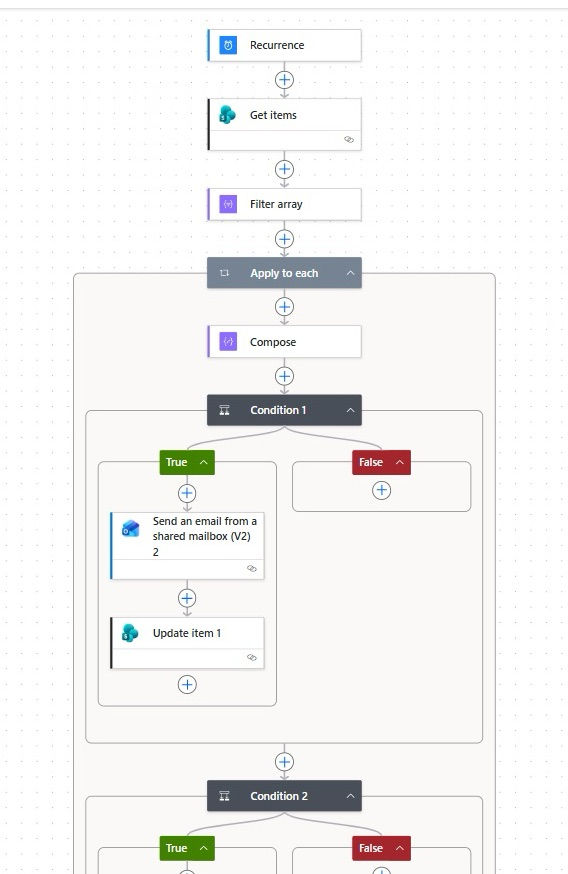
Automated package pickup tracking for a receiving department. Stores team enters two fields on a SharePoint list (recipient name + bin number). Power Automate looks up the recipient's email and manager from the Microsoft directory, then sends three escalating notifications: Day 1 (email to recipient), Day 5 (reminder), Day 10 (escalation with manager CC'd). The SharePoint list is color-coded by overdue status and displayed on a physical monitor in the building's badge room.
Tool Stack:
SharePoint
Power Automate
Microsoft Directory
Impact:
-
Pending pickups dropped from 125+ to under 60 on launch day
-
Sustained reduction since — zero manual follow-up by stores team
-
Physical badge room display gives building-wide visibility